Scientific ROI annotation software

Precision ROI editing for microscopy, histology, and fluorescence imaging.

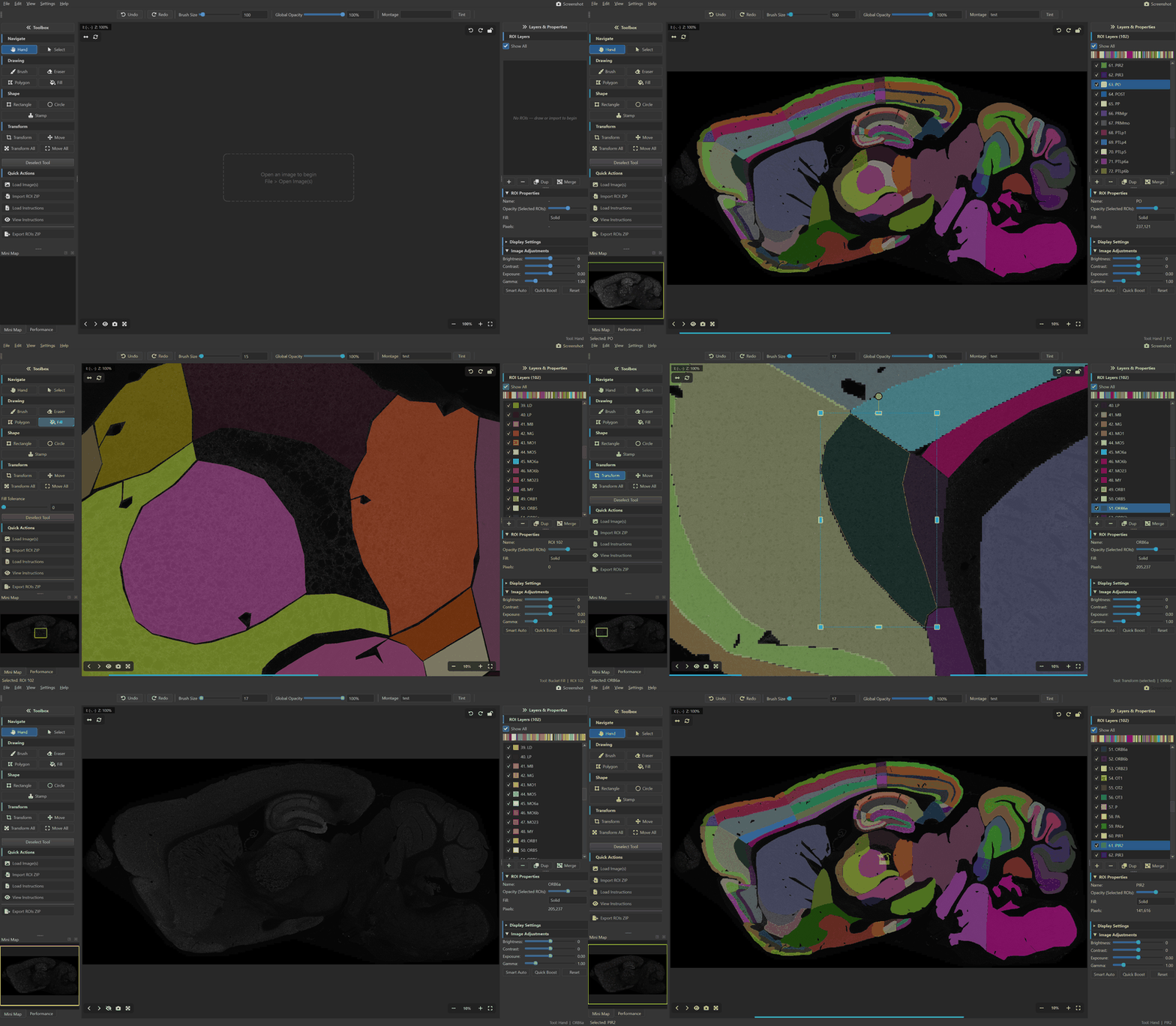
Montaris-X is a free desktop ROI editor built for labs that need accurate delineation, multi-channel viewing, and clean exports without cloud lock-in or heavyweight setup.

Windows, macOS, and Linux16/32-bit TIFF and multi-channel supportImageJ .roi and ZIP compatibleOffline by default
Built for lab image reviewLocal-first desktop app
Montaris-X interface showing ROI drawing on a scientific image
16/32-bitMicroscopy-ready image depth
7 toolsDrawing, stamping, and fill workflows
20 colorsDistinct ROI palettes for layered review
0 uploadEverything stays on your machine
Why it stands out

Purpose-built for scientific delineation work

Generic image viewers can draw masks, but they are usually not optimized for repeated ROI review across large microscopy or histology images. Montaris-X is tuned for that exact task.

Microscopy-ready viewing

Read scientific images without flattening the workflow

Montaris-X opens the image types research teams actually work with and keeps contrast, channel, and orientation controls close to the annotation surface.

  • 16-bit and 32-bit TIFF support with tiled rendering for large datasets.
  • Composite, montage, grayscale, and false-color display modes for multi-channel review.
  • Fast brightness, gamma, and exposure adjustments while you annotate.
ROI editing

Delineate complex structures without layer gymnastics

The editing model is tuned for repeated scientific delineation work rather than generic painting or image manipulation.

  • Brush, eraser, polygon, rectangle, circle, stamp, and bucket fill in one toolset.
  • Component-aware transforms let you move or scale connected regions without splitting layers.
  • Auto-save and session recovery reduce the risk of losing long review sessions.
Interoperability

Stay compatible with downstream analysis pipelines

Montaris-X fits into labs that already rely on ImageJ, Python, or mask-based analysis without forcing a proprietary export path.

  • Import and export ImageJ .roi files and ZIP bundles directly.
  • Save native .npz sessions with labels, colors, and metadata preserved.
  • Export masks and overlays for reporting, QC, or post-processing steps.
Local-first delivery

Desktop software that respects scientific data handling

The application runs locally, keeps research images on your machine, and ships as an open-source project that teams can inspect and extend.

  • No mandatory account, server dependency, or cloud upload step.
  • Cross-platform desktop delivery for Windows, macOS, and Linux labs.
  • MIT-licensed source on GitHub with PyPI distribution for direct install.
Workflow

Move from image import to export without tool sprawl

The product flow stays focused: load a scientific image, build ROI layers, refine structures, and export to the format your pipeline already expects.

01

Load microscopy or histology images

Open fluorescence, brightfield, atlas, or section images and keep scientific display controls close to the canvas.

02

Build layered ROI sets quickly

Create distinct ROI layers, assign readable colors, and switch tools based on the structure you need to capture.

03

Refine components with precision

Tighten masks, transform connected components, and compare channels without leaving the editing surface.

04

Export to the format the lab expects

Ship ImageJ ROI bundles, masks, overlays, or native sessions with minimal cleanup before analysis.

Comparison

A tighter fit than general-purpose image tools

Montaris-X keeps ROI work fast and focused while remaining compatible with established ImageJ workflows and common scientific image formats.

CapabilityMontaris-XImageJ / FIJIQuPathNapari
Purpose-built for ROI delineationYesNoNoNo
16/32-bit TIFF supportYesYesYesYes
Multi-channel composite viewingYesYesYesYes
Component-aware transformYesNoNoNo
ImageJ .roi import/exportYesNativeYesPlugin
Brush, polygon, and stamp toolsYesPartialPartialPartial
Session auto-save and recoveryYesNoNoNo
Cross-platform desktop appYesYesYesYes
Free and open sourceMITPublic domain / GPLGPLBSD
FAQ

Common questions from research teams

These are the questions most likely to come up when evaluating an ROI editor for scientific image annotation.

Who is Montaris-X built for?

It is aimed at research teams working on microscopy, histology, atlas delineation, fluorescence imaging, and other scientific annotation workflows where ROI precision matters.

Can I keep using existing ImageJ ROI files?

Yes. Montaris-X imports and exports ImageJ .roi files and ZIP bundles so labs can adopt it without rebuilding established ROI archives.

Does it require an online account or hosted backend?

No. The editor runs locally on your machine, which keeps research data private and makes the workflow easier to deploy in controlled environments.

Is it limited to one image style or one operating system?

No. It is designed for scientific image review across Windows, macOS, and Linux, including large TIFF, fluorescence, and multi-channel image workflows.

Acknowledgments

Montaris-X is developed in the Centre for Clinical Brain Sciences, University of Edinburgh, with support from the Grant Lab. Special thanks to Prof Seth Grant, Nicolas Martinez-Wise, Jessica Griffiths, Colin Yuan, and everyone in the Grant Lab for their contributions and feedback.

Start quickly

Install once, annotate locally, export anywhere.

Use the installation guide for platform-specific setup, or jump straight in from PyPI if you already manage Python environments.