MontageROI Segmenter
A browser-based ROI annotation tool for large microscopy montage images. Built with Flask and Three.js so researchers can inspect, annotate, transform, and export ROI overlays directly in the browser instead of relying on desktop-only workflows.
Researchers needed a browser-based way to annotate huge TIFF montages without falling back to desktop-only or proprietary tooling.
Built the web app, WebGL viewer, ROI editing workflow, import/export path, and touch-friendly interaction model.
Made large-image annotation practical in the browser while staying compatible with existing ImageJ-based research workflows.
Lead Developer
Ongoing
Reader-first case study
This case study focuses on problem framing, implementation choices, technical constraints, and outcome.
Lead Developer
Ongoing
Research project
2025
This tool is used in research workflows. The case study focuses on the engineering decisions and annotation experience rather than internal datasets.
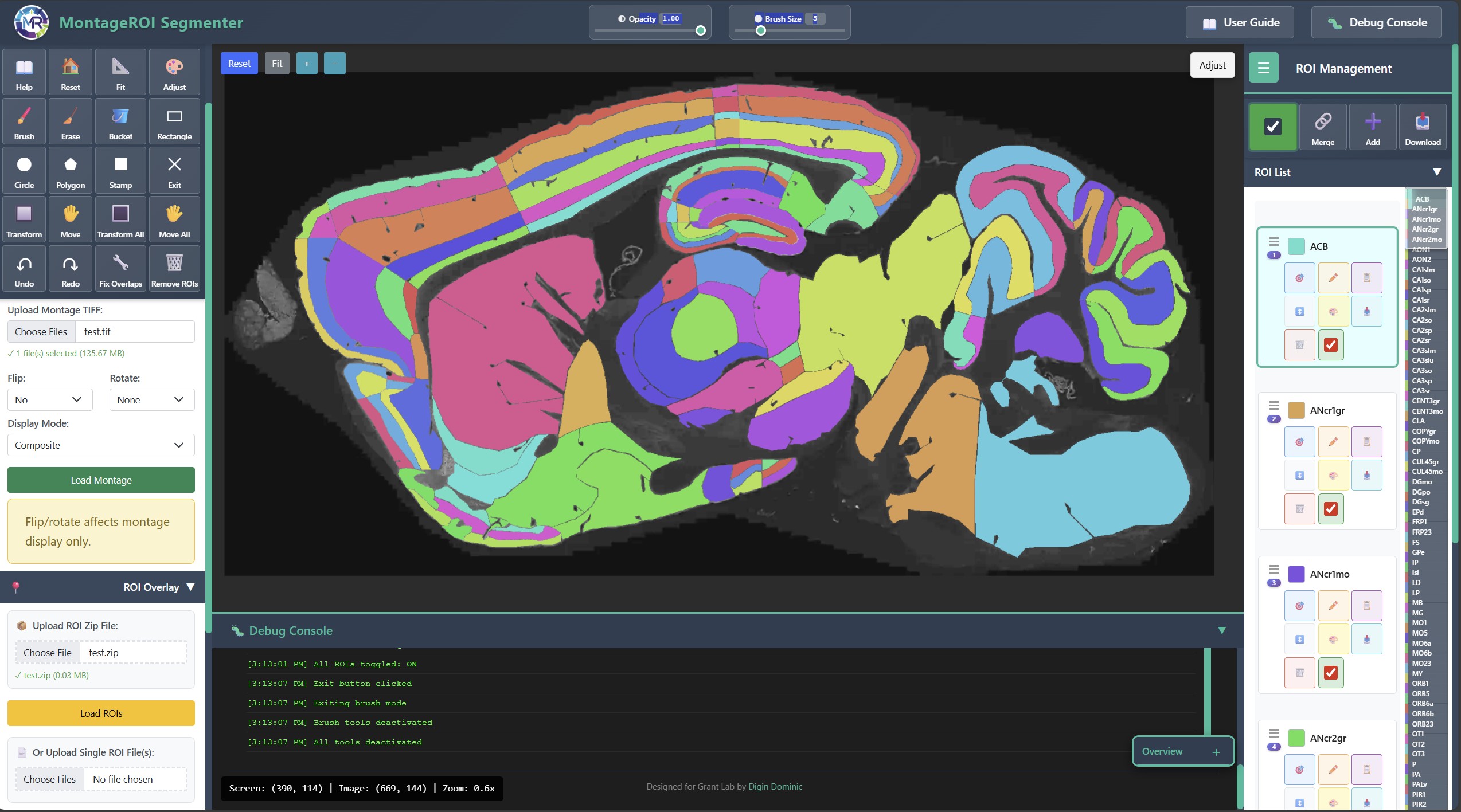
Smooth pan and zoom for large montage TIFF images using Three.js/WebGL
ROI drawing, layer management, transform tools, undo/redo, and ImageJ-compatible export
Designed for real annotation work, including touch-device use
Overview
MontageROI Segmenter is a specialised web application for annotating high-resolution microscopy montage images. It lets researchers load large TIFF-based datasets, work with ROI layers directly in the browser, and export the results into formats that fit the rest of the lab's analysis pipeline.
The important part here is not just that it supports annotation. It is that the annotation workflow remains usable even when images are large, interactions are complex, and the downstream tooling still expects ImageJ-compatible output.
Problem
Large montage images are awkward to work with. Researchers still need precise ROI creation, but many existing tools either assume desktop usage, struggle with large images, or fit badly into the actual lab workflow.
This project needed to solve several problems at once:
- smooth viewing and navigation for large montage images
- a usable ROI editing model with multiple tools and layers
- export compatibility with existing ImageJ/FIJI workflows
- support for touch-oriented workflows, not just mouse-and-keyboard usage
What I Built
I built the application around a browser-based editor with a WebGL image viewer, layered ROI management, and import/export support for existing lab formats.
The main workflow includes:
- loading and navigating high-resolution montage imagery
- creating and editing ROI layers with brush, fill, polygon, and shape tools
- applying transforms and managing visibility across ROI layers
- tuning image display with brightness, contrast, and exposure adjustments
- exporting results in ImageJ-compatible ROI ZIP format
Technical Decisions
Rendering and interaction
Three.js and WebGL provided the right base for smooth zooming and navigation across large images. The viewer uses an orthographic-style 2D interaction model so the editing experience feels precise rather than game-like.
Editing workflow
The ROI system had to support more than simple drawing. Researchers needed layer control, transformations, visibility management, and non-destructive editing patterns such as undo/redo.
Interoperability
ImageJ compatibility mattered because the web tool could not become an isolated island. Import and export support had to fit the rest of the lab's analysis stack.
Constraints
The main constraints were:
- very large montage imagery
- precision requirements for scientific annotation
- interoperability with existing analysis tools
- the need for a workflow that researchers could use repeatedly, not just occasionally
Outcome
MontageROI Segmenter turned a difficult annotation task into something that could happen directly in the browser without abandoning the surrounding research pipeline. It is a strong example of domain-specific interface engineering: not generic UI work, but a tool shaped by how researchers actually need to interact with image data.
Deployment Notes
The tool is containerised for deployment and designed to sit cleanly inside a broader research tooling environment.